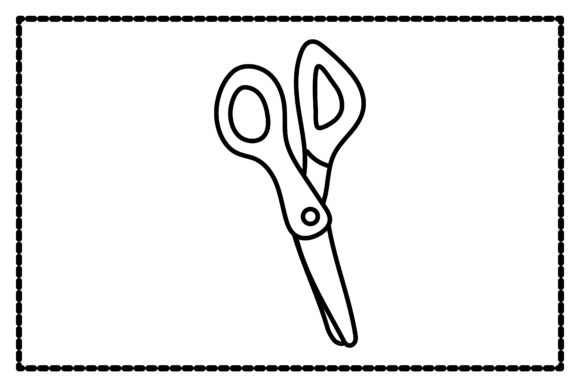
Back to School Scissors Outline Icon
Whether you’re designing a classroom newsletter, launching an education-themed Etsy shop, or preparing back-to-school social media posts, the Back to School Scissors Outline Icon offers clean, scalable visual shorthand for cutting, crafting, learning, and new beginnings. It’s not just a symbol—it’s a versatile design asset built for real-world use across digital and print workflows.
What This Icon Actually Is—and Why Format Variety Matters
This is a single, thoughtfully crafted outline-style icon of scissors—simple, legible at small sizes, and unmistakably tied to school-year energy: supply lists, paper crafts, student handouts, and creative learning. Unlike generic clipart, it’s designed with intention: balanced negative space, consistent stroke weight, and neutral proportions that work whether placed beside a “First Day Countdown” banner or layered into a lesson plan PDF.
What sets it apart isn’t just the shape—but how many ways you can use it. You receive six distinct file formats, all built on the same 1920px × 1280px canvas:
- AI (Adobe Illustrator) — For designers who need full vector control: recolor, resize infinitely, or tweak anchor points without quality loss.
- EPS — A reliable, legacy-safe vector format compatible with older design software and some print vendors.
- SVG — Ideal for web use: embed directly in HTML, scale responsively, and animate with CSS or JavaScript.
- DXF — Ready for laser cutters, CNC machines, or vinyl plotters—perfect if you’re making physical classroom decor or custom craft kits.
- JPG — High-resolution raster version for quick insertion into presentations, flyers, or email newsletters where vector isn’t required.
- PNG — Transparent background, crisp edges—great for overlays, social media graphics, or digital stickers.
No conversions needed. No guesswork about compatibility. Just open, place, and go—whether you’re on a Mac, Windows, or using free tools like Inkscape or Canva (with SVG or PNG uploads).
Educators & School Staff
You might be updating your classroom website before students return—or designing a printable “Scissor Safety” poster for your art corner. The outline style reads clearly even when printed at ½ inch tall. With the SVG or PNG, you can drop it into Google Slides or Seesaw in under 10 seconds. If you’re part of a district team building shared resource templates, the AI or EPS ensures consistency across documents—no pixelation when zoomed in during staff training.
Small Business Owners & Craft Sellers
If you sell back-to-school planners, laminated behavior charts, or DIY supply kits on Etsy or Shopify, this icon helps reinforce your theme visually—without copyright risk. Use the DXF to cut vinyl labels for pencil boxes, or layer the SVG into Canva to build cohesive product banners. Because it’s outline-only (no fill), it adapts easily to your brand palette—just change the stroke color to match your logo.
Bloggers & Content Creators
You don’t need to be a designer to benefit. A blogger writing “10 Back-to-School Organization Hacks” can use the JPG or PNG in their featured image or as bullet points in a carousel post. The clean lines ensure readability even on mobile feeds. And because it’s not overly detailed or cartoonish, it feels professional—not childish—making it suitable for audiences ranging from kindergarten teachers to college advisors.
Freelancers & Marketing Professionals
When you’re juggling tight deadlines and client revisions, having one icon in six formats saves time. Need to swap from web to print? Pull the EPS instead of re-exporting. Building a brand kit for a tutoring startup? Drop the AI file into your master library so future assets stay aligned. The consistency across formats means less QA overhead—and fewer “why does this look blurry?” moments before final delivery.
What to Consider Before You Use It
Not every icon fits every goal—and that’s okay. Ask yourself:
- Do you need flexibility or speed? Beginners often prioritize PNG/SVG for drag-and-drop ease. Experienced users may lean on AI/EPS for precise editing.
- Is this for screen, print, or physical production? SVG and JPG cover most digital needs; EPS and AI suit high-res print; DXF unlocks fabrication.
- Are you sharing files with others? If collaborators use different software, offering multiple formats avoids bottlenecks—no one has to install Illustrator just to adjust a color.
- Does your project value simplicity over detail? Outline icons like this one work best when clarity matters more than realism—ideal for infographics, checklists, or minimalist branding.
It’s also worth noting: this isn’t a full icon set. It’s one focused, reusable element—so it shines in targeted applications, not sprawling UI systems. That focus makes it reliable, lightweight, and easy to evaluate: does it serve *your* immediate need? If yes, it’s ready.
A Practical Example Across Two Real Scenarios
Scenario 1: A homeschool parent creating weekly printable schedules. They download the PNG, drag it into a Word doc next to “Art Time,” then copy-paste it five times—no resizing, no transparency issues. Done in under a minute.
Scenario 2: A freelance graphic designer building a pitch deck for a new after-school STEM program. They import the AI file into Illustrator, recolor the stroke to match the client’s navy-and-teal palette, group it with a chalkboard texture, and export as SVG for the interactive presentation. The icon scales perfectly on both laptop and projector displays.
Same icon. Different tools. Same outcome: clear, confident communication about learning and preparation.
Final Thought: Matching Tools to Intent
The Back to School Scissors Outline Icon doesn’t promise magic—it promises utility. It meets people where they are: whether you’re opening your first Canva project or fine-tuning kerning in Illustrator. Its strength lies in being both simple enough to use immediately and robust enough to grow with your skills or projects. You don’t need to master vector editing to benefit from the SVG. You don’t need a laser cutter to appreciate the DXF’s existence—it’s there when you need it.
If your goal is to communicate readiness, creativity, or hands-on learning—clearly, consistently, and efficiently—this icon fits. Not because it’s flashy, but because it works, quietly and well, across the many ways people prepare for what comes next.